Tile Builder: Area Game for Grades 3‑5
Order tiles, lay the floor, and stay inside the walls.
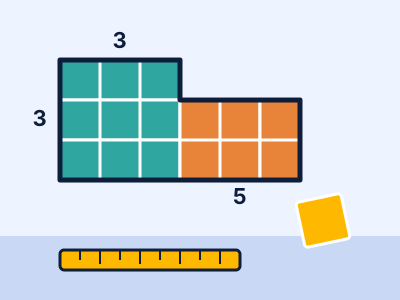
Work out how many square tiles a room needs, then lay them by dragging rectangles of tiles onto the floor. Split L-shaped rooms into rectangles, price the job, and build rooms with the same perimeter but different areas.
Play Tile BuilderFree. No signup. About 6 minutes per round.
What kids practise
Tile Builder gives students repeated, low-pressure practice with area, perimeter, multiplication, and composite shapes. It is written for grades 3-5, with levels that let younger and older players start at the right difficulty. Every question is generated fresh, so a replay is never the same, and a wrong answer shows the correct one so the round teaches as well as tests.
How it plays
Controls: Drag on the floor (or use arrow keys, then Space to start and Space to finish a rectangle) to lay tiles; press 1-4 to pick an order; U undoes, C checks, P pauses, M mutes.
It works with a keyboard, a trackpad or a touch screen, so it runs on school Chromebooks, tablets and phones.
Standards
Common Core State Standards for Mathematics this game supports:
- 3.MD.C.7
- 3.MD.D.8
For teachers
- Time: about 6 minutes per round, good for a warm-up or a center.
- Works on Chromebooks. No login, no accounts, and no personal data is collected.
- Share the page link
https://mathschools.net/play/area-tile-builder.htmlwith your class.